
Building a Home Lab for AI Security Testing
A practical guide to building a home lab for testing AI-driven security tools, covering hardware, virtualization, network segmentation, open-source tool installation, and synthetic attack traffic generation.
If you’re evaluating AI security tools by reading vendor datasheets, you’re doing it wrong. The only way to know whether an ML-based detection engine actually catches lateral movement or just generates pretty dashboards is to throw real attack patterns at it in a controlled environment.
A home lab gives you that environment. You control the network, the endpoints, and the attack traffic. You can run open-source tools alongside commercial free tiers and see exactly where each one breaks. This guide covers how to build one from scratch, what it costs, and how to generate the synthetic attack data that makes the whole setup useful.
Why a Home Lab Matters for AI Security Testing
AI security tools depend on training data and behavioral baselines. In production, you can’t safely simulate a ransomware deployment to see whether your ML detection model fires. In a lab, you can. You get to test detection accuracy, measure false positive rates, tune alert thresholds, and compare tools head-to-head without risking your employer’s infrastructure or your career.
A lab also lets you understand the failure modes. Most AI detection tools perform well against textbook attacks. Where they fall apart is against modified techniques, encrypted C2 channels, and living-off-the-land binaries. You won’t discover those gaps from a vendor demo.
Hardware: Bill of Materials
You don’t need a rack full of enterprise servers. Two realistic build tiers cover most use cases.
Budget Build (~$400-$600)
This gets you enough compute to run a small virtualization cluster with 3-5 VMs simultaneously.
| Component | Spec | Estimated Cost |
|---|---|---|
| Mini PC (primary host) | Intel N100 or AMD Ryzen 5 5600U, 32 GB RAM, 500 GB NVMe | $250-$350 |
| Managed switch | TP-Link TL-SG108E (8-port, VLAN support) | $30 |
| USB Ethernet adapter | For dedicated management interface | $15 |
| USB drive | 64 GB, for Proxmox installer | $10 |
| Cables and power strip | Cat6 patch cables, surge protector | $30 |
| Total | $335-$435 |
The N100-based mini PCs (Beelink, MinisForum) pull under 25W at load and stay silent. 32 GB RAM is the minimum for running a SIEM, a NIDS, and a few attack/victim VMs concurrently.
Mid-Range Build (~$800-$1,200)
This supports 8-12 VMs, larger log retention, and GPU-accelerated ML model training.
| Component | Spec | Estimated Cost |
|---|---|---|
| Workstation/server | Dell Optiplex Micro (refurbished), i7-12700, 64 GB RAM, 1 TB NVMe | $400-$600 |
| Second node (optional) | Another mini PC or Optiplex for clustering | $250-$350 |
| Managed switch | TP-Link TL-SG116E (16-port, VLAN support) | $60 |
| GPU (optional) | NVIDIA T400 or GTX 1650 (low-profile, for ML workloads) | $100-$150 |
| UPS | CyberPower CP425SLG | $50 |
| Total | $860-$1,210 |
Virtualization: Proxmox Setup
Proxmox VE is the default choice for security home labs. It’s free, it runs KVM and LXC containers, and it has a web-based management interface that doesn’t require a license. VMware Workstation or ESXi are alternatives, but VMware’s free tier restrictions have tightened since the Broadcom acquisition, making Proxmox the more practical option for this use case.
Installation
- Download the Proxmox VE ISO from the official site and flash it to a USB drive using Rufus or
dd. - Boot the target machine from USB and run the installer. Accept defaults unless you have a specific storage layout in mind.
- After install, access the web UI at
https://<host-ip>:8006.
VM Templates
Create base templates for the operating systems you’ll use repeatedly. This saves hours when rebuilding your lab.
- Ubuntu Server 22.04 LTS: Base template for security tool hosts (Wazuh, TheHive, SELKS).
- Windows Server 2022 Eval: Active Directory domain controller for realistic enterprise simulation.
- Kali Linux: Attack platform with pre-installed offensive tooling.
- Windows 10/11 Eval: Endpoint victim machines joined to the AD domain.
Install qemu-guest-agent on each template before converting it. This gives Proxmox visibility into VM IP addresses and allows clean shutdown commands.
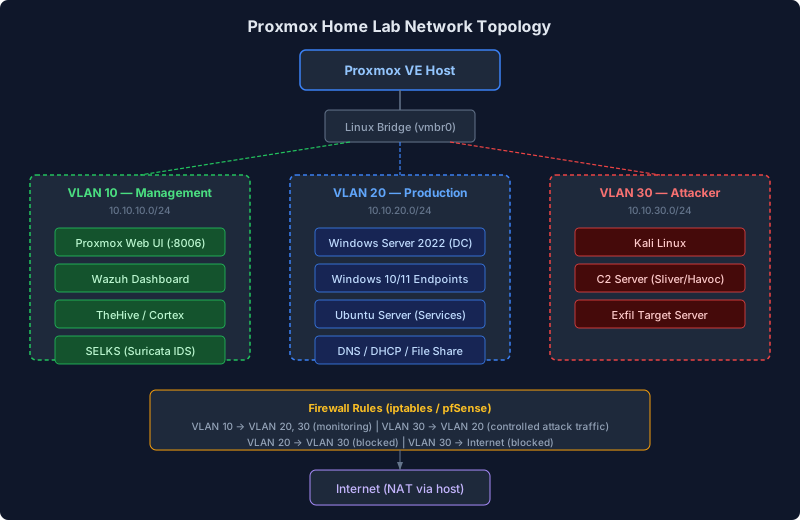
Network Segmentation
A flat network defeats the purpose of a security lab. You need segmented VLANs so your detection tools see realistic traffic patterns and your attack traffic doesn’t leak onto your home network.
VLAN Layout
| VLAN ID | Name | Purpose | Subnet |
|---|---|---|---|
| 10 | Management | Proxmox UI, SSH access, tool dashboards | 10.10.10.0/24 |
| 20 | Production | AD domain, workstations, simulated services | 10.10.20.0/24 |
| 30 | Attacker | Kali, C2 servers, exfil targets | 10.10.30.0/24 |
| 40 | Monitor | SPAN/mirror port for NIDS sensors | 10.10.40.0/24 |
Configure VLANs on your managed switch and create corresponding Linux bridges in Proxmox (vmbr1, vmbr2, etc.) tagged with the appropriate VLAN IDs. Each VM gets a NIC assigned to its VLAN’s bridge.
Firewall Rules
Use Proxmox’s built-in firewall or deploy pfSense/OPNsense as a virtual router between VLANs. The key rules:
- Management VLAN can reach all other VLANs (for administration).
- Production VLAN has no direct route to Attacker VLAN (forces attackers to pivot).
- Monitor VLAN receives mirrored traffic from Production and Attacker VLANs but initiates no connections.
- All VLANs are isolated from your home LAN. Only the Management VLAN has a NAT route to the internet for package updates.
Installing Open-Source Security Tools
These four tools form the core detection and response stack. Each runs in its own VM or LXC container.
Wazuh (SIEM + EDR)
Wazuh is the open-source SIEM and endpoint detection platform. It collects logs from all VMs, runs correlation rules, and provides a Kibana-based dashboard. The ML anomaly detection module uses statistical modeling to flag deviations from baseline behavior.
# On a dedicated Ubuntu VM (minimum 4 GB RAM, 2 vCPU)
curl -sO https://packages.wazuh.com/4.9/wazuh-install.sh
sudo bash wazuh-install.sh -a
The all-in-one installer deploys the Wazuh manager, indexer (OpenSearch), and dashboard. For lab purposes, single-node is fine. Deploy Wazuh agents on every other VM in your lab.
SELKS (Suricata + ELK + Scirius)
SELKS bundles Suricata (network IDS/IPS), the ELK stack for log visualization, and Scirius for rule management. Deploy it on the Monitor VLAN where it can inspect mirrored traffic.
# Clone and deploy via Docker Compose
git clone https://github.com/StamusNetworks/SELKS.git
cd SELKS/docker
sudo ./easy-setup.sh
sudo docker compose up -d
Configure your managed switch to mirror traffic from the Production and Attacker VLANs to the port connected to the SELKS VM’s monitoring interface. Suricata operates in passive mode on this interface, analyzing packets without inline blocking.
TheHive (Incident Response)
TheHive is a case management platform for security incidents. When Wazuh or SELKS generates an alert worth investigating, you create a case in TheHive with all the associated observables (IPs, hashes, domains). This simulates a real SOC workflow.
# On a dedicated Ubuntu VM (minimum 2 GB RAM)
# TheHive 5.x uses Docker
wget -qO- https://raw.githubusercontent.com/StrangeBeeCorp/TheHive/main/docker/docker-compose.yml \
  > docker-compose.yml
sudo docker compose up -d
TheHive integrates with Cortex for automated observable analysis (MISP lookups, VirusTotal checks, YARA scanning). Deploy Cortex alongside TheHive for the full pipeline.
Shuffle (SOAR)
Shuffle is an open-source security orchestration platform that connects your tools together. When Wazuh fires a high-severity alert, Shuffle can automatically create a TheHive case, query Cortex for IOC enrichment, and send a notification to your Slack or Discord channel.
git clone https://github.com/Shuffle/Shuffle.git
cd Shuffle
sudo docker compose up -dGenerating Synthetic Attack Traffic
A lab full of security tools staring at idle VMs is useless. You need attack traffic that exercises your detection stack, and you need it to be varied enough that ML models learn real patterns instead of memorizing a single Metasploit module.
Automated Attack Frameworks
Atomic Red Team provides small, discrete test cases mapped to MITRE ATT&CK techniques. Each “atomic” is a single test: run a PowerShell download cradle, create a scheduled task for persistence, dump LSASS memory.
# On a Windows victim VM
Install-Module -Name invoke-atomicredteam -Scope CurrentUser
Invoke-AtomicTest T1059.001  # PowerShell execution
Invoke-AtomicTest T1003.001  # LSASS credential dumping
Invoke-AtomicTest T1053.005  # Scheduled task persistence
Caldera (MITRE’s adversary emulation platform) chains multiple techniques into full attack scenarios. It runs an agent on victim machines and executes multi-step campaigns: initial access, discovery, lateral movement, exfiltration. This produces the kind of correlated event sequences that ML detection models need for training.
# On your Kali VM
git clone https://github.com/mitre/caldera.git --recursive
cd caldera
pip3 install -r requirements.txt
python3 server.py --insecure
Traffic Generation for ML Training
For ML model training, you need labeled datasets: traffic where you know what’s malicious and what’s benign.
-
Baseline recording: Run normal traffic for 24-48 hours. Browse the web from workstation VMs, run Windows updates, transfer files between shares, authenticate to services. Capture this traffic with
tcpdumpor Suricata’s EVE JSON output. Label it as benign. -
Attack recording: Run Caldera campaigns and Atomic Red Team tests during a separate window. Capture the same traffic sources. Label it as malicious.
-
Dataset merging: Combine the captures with timestamps and labels into a training dataset. Tools like CICFlowMeter can convert PCAPs into feature-rich CSV files suitable for ML model input.
-
Repeat with variation: Change attack timing, reorder techniques, use different C2 protocols (HTTP, DNS, HTTPS with domain fronting). ML models trained on a single attack pattern overfit and miss variations.
Integrating Commercial AI Tool Free Tiers
Several commercial AI security platforms offer free tiers or community editions that you can integrate into your lab alongside the open-source stack.
| Tool | Free Tier Limits | What You Test |
|---|---|---|
| Microsoft Sentinel | 10 GB/day ingestion (trial) | Cloud SIEM with ML analytics, UEBA |
| Splunk Free | 500 MB/day ingestion | SPL queries, ML Toolkit for anomaly detection |
| CrowdStrike Falcon Go | 5 endpoints | EDR with AI-powered threat scoring |
| Elastic Security | Free and open (basic license) | SIEM rules, ML anomaly detection jobs |
| VirusTotal API | 500 requests/day | IOC enrichment for TheHive/Cortex |
Forward logs from your Wazuh manager to Splunk or Elastic Security using syslog or Filebeat. This lets you compare how the same events look across different detection engines. When Caldera runs a credential dumping technique, does Wazuh catch it? Does Splunk’s ML Toolkit flag the anomaly? Does Elastic’s detection rule fire? These are the comparisons that inform real purchasing decisions.
Putting It All Together
Here’s the recommended build order:
- Day 1: Install Proxmox, create VM templates, configure VLANs and bridges.
- Day 2: Deploy Wazuh (all-in-one) and install agents on all VMs. Stand up Active Directory.
- Day 3: Deploy SELKS on the monitor VLAN. Configure switch port mirroring.
- Day 4: Deploy TheHive + Cortex. Wire Shuffle to connect Wazuh alerts to TheHive cases.
- Day 5: Install Caldera and Atomic Red Team. Run initial attack simulations.
- Day 6-7: Integrate commercial free tiers. Begin baseline traffic capture for ML training data.
After the first week, you have a functional security operations lab. From here, the work is iterative: tune detection rules, generate more diverse attack traffic, train custom ML models on your labeled datasets, and benchmark tools against each other.
The total cost for a budget build with all open-source tools is under $500. The mid-range build with GPU acceleration for ML training runs $800-$1,200. Either way, you end up with something no vendor demo can provide: an environment where you control the ground truth and can measure exactly how well each AI security tool performs against known attacks.
That’s the kind of evidence that should drive procurement decisions.